Azure fundamentals
TODO: https://learn.microsoft.com/en-us/training/modules/describe-azure-identity-access-security/
TODO search for TODOs in this file
TODO
-
TODO when home (now on mobile data): https://learn.microsoft.com/en-us/training/modules/secure-network-connectivity-azure/6-configure-access-network-security-group
-
Skimmed over the "Explore Azure networking services" module because this is not as relevant for me. But if I do an exam based on this, revisit.
-
1 tenant 1 subscription?
- 1 region 1 country?
Virtualization and containerization
Virtualization separates the tight coupling OS and hardware with an abstraction layer for CPU, memory and storage (Hypervisor technology). Virtual Machines and containerization are two examples of virtualization, with slightly different use cases.
- You can multiple VMs on a single physical host.
- You can run multiple containers on a single host, physical or virtual, without having to manage the OS
The crux of the difference is this:
- A Virtual Machine virtualizes the hardware needed to run an OS
- A container emulates the OS, needed to run an app
VMs
- VMs appears as an instance of an operating system
- Virtual Machines provide IaaS.
- Virtual Machine scale sets: support for autoscaling by adding identical VMs
- Virtual Machine availability sets: "VMs stagger updates and have varied power and network connectivity, preventing you from losing all your VMs with a single network or power failure."
- Update domain: groups VMs that can be rebooted at the same time; update one group, give 30 min to recover, only then update the next VM group
- Fault domain: grouped by common power source and network switch (by default 3-split); protects against physical power or network failure
- Azure Batch enables large-scale parallel and high-performance computing (HPC) batch jobs with the ability to scale to tens, hundreds, or thousands of VMs.
- Architecture: Server -> Fabric Controller (creates virtual machines) -> Orchestrator (handles user requests via API)
Use cases of VMs:
- Test OS and app configurations
- Address fluctuations in app demand. Start them up or shut them down based on actual needs.
- Easily extend on-premises datacenter for certain functionalities only
- When an on-premises datacenter shuts down, you can quickly start up VMs to run the critical parts of your infrastructure
- "Lift and shift": copy your on-premise setup and load as an image into a VM
Downsides:
- If you want to test different apps at the same time with different runtime environments, you may need multiple VMs
- This is a downside particularly because VMs emulate full operating systems, so operations like snapshotting can take up to minutes.
Q: What are the advantages of VMs?
Q: What's the downside of VMs?
Tutorial: Making a VM and performing some tasks
You can do this from the Azure Portal, Azure CLI, Azure Powershell, or using Azure Resource Manager (ARM) templates.
Example using Azure CLI:
az vm create \
  --resource-group learn-5bd6759c-3c0b-4e62-991f-df70535a5b7b \
  --name my-vm \
  --image UbuntuLTS \
  --admin-username azureuser \
  --generate-ssh-keys
You can refer to the VM by name in follow up steps, e.g. when installing Nginx using a Custom Script Extension:
az vm extension set \
  --resource-group learn-5bd6759c-3c0b-4e62-991f-df70535a5b7b \
  --vm-name my-vm \
  --name customScript \
  --publisher Microsoft.Azure.Extensions \
  --version 2.1 \
  --settings '{"fileUris":["https://raw.githubusercontent.com/MicrosoftDocs/mslearn-welcome-to-azure/master/configure-nginx.sh"]}' \
  --protected-settings '{"commandToExecute": "./configure-nginx.sh"}'
See here for the script that is invoked.
Get your VM's IP address and store it as a variable:
IPADDRESS="$(az vm list-ip-addresses \
  --resource-group learn-e10ac2fe-1995-4320-ae4b-2dac1998e623 \
  --name my-vm \
  --query "[].virtualMachine.network.publicIpAddresses[*].ipAddress" \
  --output tsv)"
Download homepage (will time out for now because we do not have access yet):
curl --connect-timeout 5 http://$IPADDRESS
What network security groups (NSG) are associated with our VM?
In this particular case, we did not specify a group at time of creation so a new group called my-vmNSG was automatically made.
N.B. normally it makes more sense to make a NSG, so that you can assign it to multiple VMs that require the same network rules!
az network nsg list \
  --resource-group learn-e10ac2fe-1995-4320-ae4b-2dac1998e623 \
  --query '[].name' \
  --output tsv
Which rules are associated with the NSG associated with our VM?
az network nsg rule list \
  --resource-group learn-e10ac2fe-1995-4320-ae4b-2dac1998e623 \
  --nsg-name my-vmNSG
Do the same, but now in a more readable format by querying what we need and outputting the result as a table instead of JSON:
az network nsg rule list \
  --resource-group learn-e10ac2fe-1995-4320-ae4b-2dac1998e623 \
  --nsg-name my-vmNSG \
  --query '[].{Name:name, Priority:priority, Port:destinationPortRange, Access:access}' \
  --output table
The {Name:name} syntax maps column name Name onto the output JSON field name.
The output will show only SSH on port 22 is allowed.
We also want to allow inbound traffic on port 80, which is standard for HTTP. We create a new rule for this:
az network nsg rule create \
  --resource-group learn-e10ac2fe-1995-4320-ae4b-2dac1998e623 \
  --nsg-name my-vmNSG \
  --name allow-http \
  --protocol tcp \
  --priority 100 \
  --destination-port-range 80 \
  --access Allow
Now we also have a rule for incoming traffic over HTTP:
Name               Priority    Port    Access
-----------------  ----------  ------  --------
default-allow-ssh  1000        22      Allow
allow-http         100         80      Allow
Containers
Containers are also a virtualization environment, but one where you get a standardized runtime environment without having to manage the operating system. Instead, a container bundles an app together with its dependencies. This is a more lightweight solution and makes it possible to test different apps with different runtimes at the same time on a single host.
Much like running multiple virtual machines on a single physical host, you can run multiple containers on a single physical or virtual host.
- Container instances and Kubernetes provide compute resources for containers
- You can run multiple containers on a single host machine
- "containers are lightweight and designed to be created, scaled out, and stopped dynamically."
- "While it's possible to create and deploy virtual machines as application demand increases, containers are designed to allow you to respond to changes on demand. With containers, you can quickly restart in case of a crash or hardware interruption."
- Cluster Orchestration: containers can be easily scaled up in clusters without worrying about the server that hosts the container (because containers decouple from specific server setups)
Managing containers:
- Azure container instances is a PaaS for running containers
- Azure Kubernetes Service is a container orchestration service for automating, managing, and interacting with a large number of containers, with support for containers with distributed architectures and large volumes of containers.
- In short: a dedicated cluster service for containers
Virtual Desktop
- Centralized security management for user's desktops with Azure Active Directory (Azure AD)
- Multifactor authentication
- Granular role-based access controls (RBACs)
- Less risk of losing confidential data because the data is stored in the cloud
- Supports single and multi-session environments (multiple concurrent users on a single VM)
Containers and the microservice architecture
A microservice is a webservice with a small well-defined scope, and is loosely coupled with other functionality. Because they are self-contained, they often don't even need to use the same technology stack.
We need an API so that microservices can communicate with each other and at the same time hide implementation details from the outside. The more microservices, the more you need an orchestration service for 1) high release velocity, 2) highly scalable, 3) rich domains or many subdomains, 4) small development teams.
- Break up your problem into smaller independent logical pieces
- Run each peach in its own container, e.g. one for front end, back end, and storage.
- This allows each part to be maintained, scaled or updated independently. Use cases:
- Scale back the back end to improve performance, without scaling back front end
- Switch to a different storage device
- Replace the storage container without affecting the rest of the app
- Fault Isolation
- Easy to roll back updates
- Sections can be deployed independently
Containers vs. VMs
Q: Wat is het verschil tussen containerization and virtualization?
- executing code in a container does not require you to manage an OS, setup a server or VM.
- a VM is limited to a single OS per VM, which makes running apps with different runtimes simultaneously difficult, whereas containerization allows you to run multiple instances of an applications on a single host machine (both physical and virtual)
- A VM emulates a whole OS and is thus slow
- Containers are faster because you only wait for the containerized app to launch, instead of both the OS of the VM and the app within it.
- Containerized apps also take up less space
- Containers simplify development, because your development environment can easily be made to look exactly like the production environment.
So in short, only choose to run VMs if you need full control over the whole environment. Otherwise, containers offer better performance and scalability.
Virtual Networking
Azure Virtual Networks (VNETs) and subnets enable Azure resources (e.g. VMs, web apps, databases) to communicate with each other, over the internet, and with on-premises (client) computers.
Key networking capabilities:
- Isolation and segmentation
- Create multiple isolated virtual networks with a private IP address space "by using either public or private IP address ranges" -> Q: private, but "use public or private"? Confusing.
- The IP range only exists within the virtual network and is not internet routable
- Segment IP address space into subnets
- Internet communications
- Assign a public IP to a resource
- Put the resource behind a public load balancer
- Communicate between Azure resources
- "Service endpoints can connect to other Azure resource types, such as Azure SQL databases and storage accounts. This approach enables you to link multiple Azure resources to virtual networks to improve security and provide optimal routing between resources."
- Communicate with on-premises resources
- Point-to-site virtual private network connections: from computer outside organization into your corporate network, via encrypted VPN connection to Azure virtual network.
- Site-to-site virtual private networks: link on-premises VPN device/gateway to Azure VPN gateway in a virtual network, so that "devices in Azure can appear as being on the local network"
- Azure ExpressRoute: dedicated private connectivity that is not over the internet, for high security requirements and extraordinarily high bandwidth.
- Route network traffic
- Default: route all traffic between connected VNets, on-premises networks, internet
- Route tables: define rules for direction traffic, e.g. control how packets are routed between subnets
- Border Gateway Protocol (BGP) works with Azure VPN gateways, Azure Route Server, Azure ExpressRoute "to propagate on-premises BGP routes to Azure virtual networks"
- Q: What is BGP?
- Filter network traffic
- Network Security Groups (NSG) for inbound and outbound security rules
- Network virtual appliances: specialized VMs that carry out network functions, e.g. running a firewall
- Connect virtual networks
- Virtual network peering
- Can be customized using user-defined routes (UDR)
- "Network traffic between peered networks is private, and travels on the Microsoft backbone network, never entering the public internet."
- "These virtual networks can be in separate regions, which allows you to create a global interconnected network through Azure."
Azure VPN Gateway
- A VPN gateways is a virtual network gateway that enables the following types of connectivity:
- site-to-site (see above)
- point-to-site (see above)
- network-to-network: connect one virtual network to another
- Only one VPN gateway per virtual network, however one gateway can connect to multiple networks (virtual or on-premise)
- Two types: policy-based or route-based
- both use a pre-shared key as the only method of authentication
- Policy-based VPN gateways statically indicate which packets go in which tunnel based on IP
- Route-based: IP routing is either static or dynamic; IPSec tunnels are modeled as a) a network interface or b) virtual tunnel interface
- NOTE: I do not understand what this implies
When to use the route-based gateway:
- Route-based VPN is preferred for on-premises devices because they are "more resilient to topology changes such as the creation of new subnets."
- Connection between VNETs
- Point-to-site
- Multisite connections
- Coexistence with Azure ExpressRoute gateway
Q: What are point-to-site, site-to-site, and network-to-network connections?
Azure VPN Gateways are made resilient by:
- Active/standby: the standby instance takes over during failure of the active gateway instance
- Active/active: have two active instances with two public IP addresses
- Use a VPN gateway as a failover path for physical outages affecting ExpressRoute
- VPN Gateways and ExpressRoute can be used in a zone-redundant manner
- More complicated setup, e.g. w.r.t. IP requirements
- Protection of connection from on-premises to Azure against zone-wide failures
Azure DNS
- Anycast networking: DNS queries are answered by closest DNS server
- based on ARM, so you get for free:
- RBAC
- Activity logs
- Resource locking
- Supports private DNS domains
- Supports alias record sets
App Hosting
- In a VM
- In a container
- Using the dedicated Azure App Service
- "build and host web apps, background jobs, mobile back-ends, and RESTful APIs in the programming language of your choice without managing infrastructure"
- automatic scaling, high availability
- Windows and Linux, no MacOS
- automated continuous deployments from GitHub, Azure DevOps, any Git repo
- HTTP-based for Web apps, API (e.g. REST APIs), WebJobs, Mobile apps, mobile back ends; supports various languages.
- handles infrastructure: deployment and management, securing of endpoints, scaling when high traffic, built-in load balancing and traffic manager.
Typen clouds
- Openbare cloud: in principe voor iedereen toegankelijk.
- Dedicated host / Privécloud: resources uitsluitend voor bedrijf beschikbaar.
- MAAR er komen dan kosten bij opstart, onderhoud, uitbreiding van de hardware
- MAAR dus ook verantwoordelijk voor hardwareonderhuid en beveiliging
- WEL volledige controle over resources en beveiliging
- Hybride cloud: binnen deze omgeving worden gegevens tussen een openbaar en prive cloud gedeeld.
- Meest flexibel; organisatie beheert waar welke toepassing moet worden uitgevoerd.
- Nog steeds verantwoordelijk voor beveiliging en naleven van wetten.
- Multi-cloud: gebruik meerdere publieke cloud providers, bijv. omdat je in een transitie zit of omdat providers verschillende features aanbieden.
Q: Wat zijn de drie hoofdtypen cloud modellen?
Q: Wat is een multi-cloud situatie?
Voordelen cloud:
- Beschikbaarheid
- Afhankelijk van contract, geen merkbare downtime
- Schaalbaarheid
- Verticaal: verhoog rekencapaciteit, e.g. meer CPUs in een VM
- Horizontaal: Meer instanties van resources, bijv. meer VMs
- Voorspelbaarheid
- Van kosten
- Van performance
- Elasticiteit
- Bijv. automatische schaalaanpassing
- Geo-distributie
- voor beste prestaties in regio van klant
- Betrouwbaarheid. Herstel na noodgeval
- door back-ups, gegevensreplicatie en geo-distributie.
- Veiligheid & governance
CapEx vs. OpEx
- CapEx (Capital Expenses): besteding vooral in fysieke apparatuur, vervolgens afschrijfkosten over tijd
- Wordt in balans dus opgenomen als activa, nl. als een kapitaalinvestering die over tijd waarde verliest.
- Onderhoud, ondersteuning
- OpEx (Operational Expenses): betaling voor gebruikte services en kosten op het moment dat je ze daadwerkelijk gebruikt
- De cloudservices zelf kennen geen afschrijfbare activa en beinvloeden direct de nettowinst, belaste inkomen, kosten op de balans etc.
Contradictie:
- "IaaS is de meest flexibele categorie van cloudservices. Hiermee hebt u volledige controle over de hardware waarop uw toepassing wordt uitgevoerd. Met IaaS huurt u hardware, in plaats van dat u deze aanschaft."
- "Flexibiliteit. PaaS is flexibeler dan IaaS en gebruikers hoeven geen servers te configureren voor het uitvoeren van toepassingen."
Shared responsibility cloud service models: IaaS, PaaS, SaaS.
Cloud computing works with a shared responsibility model. Depending on the chosen model, the responsibilities are distributed over cloud provided and cloud client/tenant:
- Infrastructure as a Service (IaaS)
- Platform as a Service (PaaS)
- Software as a Service (SaaS)
IaaS: Dit cloudservicemodel benadert het meest het beheren van fysieke servers. Een cloudprovider houdt de hardware up-to-date, maar het onderhoud van het besturingssysteem en de netwerkconfiguratie blijft een taak van u als cloudtenant. Virtuele Azure-machines zijn bijvoorbeeld volledig functionerende virtuele rekenapparaten die worden uitgevoerd in de datacentra van Microsoft. Een voordeel van dit cloudservicemodel is de snelle implementatie van nieuwe rekenapparaten. Het instellen van een nieuwe virtuele machine is aanzienlijk sneller dan het aanschaffen, installeren en configureren van een fysieke server.
PaaS: Dit cloudservicemodel is een beheerde hostingomgeving. De cloudprovider beheert de virtuele machines en netwerkresources en de cloudtenant implementeert de bijbehorende toepassingen in de beheerde hostingomgeving. Azure App Services biedt bijvoorbeeld een beheerde hostingomgeving waar ontwikkelaars hun webtoepassingen kunnen uploaden, zonder dat ze zich zorgen hoeven te maken over fysieke hardware- en softwarevereisten.
SaaS: In dit cloudservicemodel beheert de cloudprovider alle aspecten van de toepassingsomgeving, zoals virtuele machines, netwerkresources, gegevensopslag en toepassingen. De cloudtenant hoeft alleen maar hun gegevens op te geven bij de toepassing die door de cloudprovider wordt beheerd. Microsoft Office 365 biedt bijvoorbeeld een volledig werkende versie van Microsoft Office die in de cloud wordt uitgevoerd. U hoeft alleen maar uw inhoud te maken; Office 365 doet de rest.
As you can see, some things are always managed by the cloud provider (indicated with X), whereas some things are always taken care of by the client.
| Responsibility | On premises | IaaS | PaaS | SaaS |
|---|---|---|---|---|
| Info & Data | ||||
| Access control | ||||
| Accounts & ids | ||||
| Id & dir. infrastr. | +/- | +/- | ||
| Runtime | +/- | X | ||
| Network controls | +/- | X | ||
| Applications | +/- | X | ||
| Operating System | X | X | ||
| Virtual Machine | X | X | ||
| Compute | X | X | X | |
| Networking | X | X | X | |
| Storage | X | X | X |
Q: What is meant with serverless computing?
- Met serverloze toepassingen wordt de infrastructuur die is vereist om de code uit te voeren, automatisch ingericht, geschaald en beheerd door de cloudserviceprovider; specifiek wanneer deze resources nodig zijn, d.w.z. inrichting infrastructuur is op basis van een trigger.
- Vergeet ook niet dat de code nog steeds wordt uitgevoerd door servers. De term 'serverloos' wil zeggen dat de taken die zijn gekoppeld aan de inrichting en het beheer van de infrastructuur, onzichtbaar zijn voor de ontwikkelaar.
- See Azure's Functions
Q: What is meant with the shared responsibility model in cloud computing?
Q: What are the three service models for shared responsibility in cloud computing?
Q: Which type of cloud service is most useful for a lift-and-shift migration from an on-premises data center to a cloud implementation?
You can use the IaaS model to replicate your on-premises setup to make the transition easier.
Serverless Computing
If your application logic is event-driven and is waiting for some input before processing most of the time, then you are paying for resources while no computation is happening. In this case, serverless computing may be a good option because in this case all resources are allocated and deactivated based on exact demand (and you are billed as such). You don't need to reserve capacity.
Serverless computing typically handles back-end scenarios.
Examples of events:
- Timers
- HTTP, API and webhook scenarios
- Queues, such as used in order processing
Features:
- Abstraction of servers
- Event-driven scale
- Micro-billing
Within Azure, this is handled by Azure Functions (more imperative, coding) and Azure Logic Apps (more declarative, designer-first).
Azure Logic Apps has orchestration in mind, connecting many disparate services via their APIs. If your flow has a lot of logic requiring more complex algorithms, Azure Functions is more suitable.
You can make Functions stateful by passing in a context that tracks previous activity. These are called Durable Functions.
Azure Workflows (did I mean Logic Apps?) trigger workflows rather than a function, designed to automate business scenarios from predefined logic blocks. These workflows are be composed visually in a GUI by connecting logic blocks. This is useful for a business analyst role.
Organisatiestructuur
Hierarchisch model:
- Management group / Beheergroep, voor wijzigingen doorvoeren in alle abonnementen
- Subscription / Abonnement, beheer van kosten voor resource groups
- Resource group, logische container voor resources; kun je zelf organiseren
- Alle resources moeten zich in een resource groep bevinden
- Een resource kan slechts in één resource groep zitten
- Kunnen niet worden genest
- Maakt het makkelijk role-based access control (RBAC) op groepen resources toe te passen, of hele groepen resources in een keer te verwijderen.
- Azure Resource Manager regelt verificatie, autorisatie voor toegang tot resources via een API die inzichtelijk is voor Azure portal, Azure PowerShell, Azure CLI en andere clients.
- Resource, e.g. VM instantie, SQL-database;
Usefulness of management groups:
- Create a hierarchy that enforces a policy that cannot be altered at lower levels, e.g. the subscription owner or resource groups
- You can apply Azure role-based access control (RBAC) on the management group, which is handy if the same RBAC holds for several groups of subscriptions.
Notes:
- Both management groups and subscription groups support only one parent
- A resource can only be in one resource group
- Q: But can a resource group be part of multiple subscriptions? This is left in the middle.
Distribution of data centers over regions
Binnen een Azure regio heb je verschillende geisoleerde beschikbaarheidszones (availability zone) die zijn verbonden met een snel en privaat glasvezelnetwerk.
- Een regio bevat minstens drie zones.
- Een zone heeft een of meerdere datacentra
Aanpak: plaats je services in een beschikbaarheidszone, en repliceer dan in de anderen in dezelfde regio.
Niet alle services ondersteunen beschikbaarheidszones. De volgende services wel:
- Zonegebonden services, zoals een VM die op een bepaalde locatie wordt geïnstalleerd
- Zone-redundante services, e.g. zone-redundante opslag of duplicatie van een SQL server
- Niet-regionale services, deze zijn altijd beschikbaar vanuit geografische gebieden en dus tolerant voor storingen op zone- of regio niveau.
Om te beschermen tegen grote rampen op regio niveau, zoals natuurrampen, heeft elke regio binnen een regiopaar een gekoppelde regio - wel binnen dezelfde geografische zone - die minstens 480km (300 miles) verderop ligt.
Dit heeft verdere voordelen:
- Bij lange onderbreking krijgt een regio in het paar prioriteit voor het herstel
- Updates in gepaarde regio's zijn per regio, zodat de andere regio eventuele downtime en problemen kan ondervangen
- Omdat gegevens binnen hetzelfde geografische gebied blijven blijft de juridische- en belasting situatie hetzelfde met een enkele uitzondering.
Zones and countries:
- One country can have multiple regions, e.g. UK South and UK West;
- But in principle, each region is located in one country
TODO what is a "sovereign region"
Sovereign regions are isolated from the main instances of Azure, either for compliance or legal purposes:
- e.g. US DoD Central is available for US government agencies and are physically and logically isolated.
Azure Storage
Redundancy options
- Locally redundant storage (LRS)
- Replicates three times within a single data center in the primary region
- 11 nines of durability 99.999999999% over a year
- Geo-redundant storage (GRS)
- similar to running LRS in two regions
- 16 nines of durability
- Read-access geo-redundant storage (RA-GRS)
- Also enable read access even if the primary region does not fail
- Zone-redundant storage (ZRS)
- Replicates three times across three Azure availability zones in the primary region
- Not all zones have availability regions
- 12 nines of durability
- When? If high availability is crucial
- When? If governance restricts replication within a country or region.
- Geo-zone-redundant storage (GZRS)
- Similar to running ZRS in the primary region and LRS in the secondary region
- 16 nines of durability
- Read-access geo-zone-redundant storage (RA-GZRS)
- cf. RA-GRS
Which option you pick depends on how you design replication in your region pair (primary + secondary region):
- Primary region: data is always replicated three times in the primary region
- There are two options here: LRS and ZRS
- Secondary region:
- There are two options here: GRS and GZRS
General notes:
- Replication in the primary region is synchronous, but replication in the secondary region is asynchronous
- So on a fail of the primary region, you still may lose data if the primary region cannot be recovered
- Recovery point objective (RPO): the difference in time between the last write in the primary and the secondary region
- No SLA on the RPO, but typically less than 15 minutes
- By default you can only read the data in the secondary region if the primary region fails, but you can enable read access anyways with RA-GRS and RA-GZRS.
- Without read access options: upon failure the secondary becomes the primary region, which then gets read access by default
- When reading data in the secondary region, take into account the RPO and that you may not have the most up to date information from the primary region!
Storage account types
- Standard general-purpose v2
- Services: Blob Storage (incl. Data Lake), Queue Storage, Table Storage, Azure Files
- Redundancy: all
- Premium block blobs
- Services: Blob Storage (incl. Data Lake)
- Redundancy: LRS, ZRS
- Premium file shares
- Services: Azure Files
- Redundancy: LRS, ZRS
- Premium page blobs:
- Services: Page blobs only
- Redundancy: LRS (lowest of all!)
Storage endpoints
- Some rules for naming storage accounts (3-24 chars, numbers, lowercase only)
- Name must be unique in the whole Azure service so that it's accessible via a unique endpoint
- Example for blob storage:
https://<storage-account-name>.blob.core.windows.net
Storage services
See here Note that there's different type of storage accounts that use different storage services. The main listing here names services, with sublists indicating account types that use them.
- Azure Disks: permanent block-level storage volumes and opened via coupled virtual hard drive (i.e. path volume within Azure VMs)
- Azure Blobs: object storage for unstructured data i.e. without filetype limitations, mainly used for text and binary data
- Includes Data Lake Storage Gen2
- Premium block blobs account:
- Recommended for scenarios with high transaction rates, low storage latency, or that use smaller objects.
- Append blobs (not a separate account?) are also blocks but optimized for appending, so useful for logging specifically
- Premium page blobs account: 512-byte pages up to 8TB in total size, designed for frequent random read/write operations (foundation of IaaS Disks)
- Azure Files: shareable file accessible by URL
- Premium file shares uses this.
- Supports both Server Message Block (SMB)-protocol and Network File System (NFS)-protocol
- Mountable concurrently in cloud or on-premises resources
- NFS Azure files is not available from Windows clients
- SMB Azure file shares can be cached on Windows Servers with Azure File Sync for faster access
- Azure Queues: messaging store for reliable messaging between application components
- Each individual message can be up to 65KB in size
- Often used to create a backlog of work for asynchronous processing
- Can be combined with compute functions such as Azure Functions to automatically perform an action upon message receival!
Notes:
- Page Blobs only have LRS redundancy.
- What about Queue Storage and Table Storage? These are named in the detailed docs but are neither listed as an account or storage service
Q: What is een "block" blob?
Q: Wat gebruik je voor het opslaan van queues?
Blob use cases:
- thousands of parallelle uploads
- providing images or documents directly to a browser
- streaming large quantities of video and audio
- growing logs
- saving memory for back-ups
Files use cases:
- File sharing
- Share configuration files to load them in multiple VMs
- Use file share for data for analysis, such as logbooks, metrics, crashdumps.
- Familiar programmability: files are accessible via known file system I/O APIs, which helps when migrating (can use existing skills)
Blob vs. disk:
- Developers don't have to think about the disk formatting when using blob
- Blobs are saved in containers
(Blob) Storage access tiers
The following applies to blob storage.
Blobs can be accessed via HTTP/S "via URLs, the Azure Storage REST API, Azure PowerShell, Azure CLI, or an Azure Storage client library. The storage client libraries are available for multiple languages, including .NET, Java, Node.js, Python, PHP, and Ruby."
Blobs are organized in layers, depending on the frequency of access. This is done for cost-effectiveness. We need to reserve more resources for accessing data that is needed frequently. There is thus an availability-storage cost trade-off to make!
- Hot access tier: dynamic access layer for frequently used files
- E.g. images for websites
- Cool access: static access layer, for files that are rarely opened and saved for at least 30 days
- E.g. invoices
- Slightly lower availability in the SLA, but high(er) reliability and still high retrieval latency and throughput!
- Archive access tier: layer for files stored for at least 180 days and accessed very rarely (offline storage!)
- E.g. long term backup
- Saved offline so very low costs for saving the data
- However, very expensive to bring the data back online so getting access again (availability) is highest.
General notes:
- Hot and cool access can be set at account level, but archive access not (only on blob level if I understood correctly)
- All access tiers can be set at the blob level, during or after upload
Data Migration options
- Azure Migrate
- For migration from on-premises to the cloud
- Unified migration platform with single portal
- Range of tools for assessment of on-premises infrastructure (Azure Migrate: Discovery) and server migration (Azure Migrate: Server Migration)
- working with tools from ISVs via ISV offerings (independent software vendor)
- Azure Data Box
- physical migration service
- max capacity of 80 TB
- tracked end-to-end
Data box is worth considering with 1) >40Tb of data and 2) scenarios with no to limited network connectivity.
Use cases for data box:
- Importing
- onetime migration of large amounts of on-premises data
- Moving an offline media library online
- Migrate VM farm, SQL server, applications to Azure
- Initial bulk transfer, followed by incremental transfers over the network
- Periodic uploads of large quantities of data
- Exporting
- Disaster recovery of Azure data on an on-premises network
- If security requirements require you to export data out of Azure
- Migrate back from Azure to another service or on-premises
File movement
- AzCopy: CLI tool for copying blobs or files to or from a storage account
- Also supports one-direction synchronization
- Azure Storage Explorer: GUI for AzCopy, works on all main OSs
- Azure File Sync: centralize file shares in Azure Files, but keep features of Windows server
- Does bi-directional syncing between Azure cloud and on-premises Windows Server, cf. AzCopy
- Install on local Windows Server
- Utilizes benefits of Windows Server, e.g. caching, failure recovery, cloud tiering to locally replicate the most frequently accessed files
Databases
Requirements:
- Low latency
- High availability
- Scalable
Types of databases:
- Azure Cosmos DB
- Azure SQL Database
- Azure SQL Managed Instance
- Azure Database for MySQL
- Azure Database for PostgreSQL
- Azure Synapse Analytics
- Azure HDInsight
- Azure Databricks
- Azure Data Lake Analytics
Azure Cosmos DB
- Distributed, multi-model database service
- I think multi-model means it supports many well known APIs?
- e.g. APIs: SQL, MongoDB, Cassandra, Tables, Gremlin
- Stores data as ARS-format (Atom-Record-Sequence)
- These are accessible through various APIs
- The advantage of this approach is that a team of developers can use the API of their choice; very handy when newly migrating to Azure.
Q: Azure Cosmos DB is a multi-model database service? What does that mean?
Q: Azure Cosmos DB is a multi-model database service. What is the main advantage of this for teams?
Azure SQL Database
- Microsoft SQL Server database engine
- PaaS database engine; no need to manage infrastructure and database-management steps such as upgrading, patching, backups, monitoring
- 99.99% availability
- Processes both relational and non-relational data (graphcs, JSON, spatial data, XML)
- Intelligent query processing and in-memory techniques
- Migrate from your on-site SQL server using the Azure Database Migration Service.
Q: What's an elastic pool?
Elastische pools bieden een eenvoudige en kosteneffectieve oplossing om de prestaties van meerdere databases te beheren binnen een vast budget. Een elastische pool voorziet in resources voor berekening (eDTU's) en opslag die worden gedeeld met alle databases die deze pool bevat. Voor databases binnen een pool worden alleen de vereiste resources gebruikt, wanneer deze nodig zijn en binnen instelbare limieten. De prijs van een pool is alleen gebaseerd op het aantal resources dat is geconfigureerd en is niet afhankelijk van het aantal databases dat de pool bevat.
Q: What is collation? (database sortering)
See: https://learn.microsoft.com/nl-nl/sql/t-sql/statements/collations?view=sql-server-ver16
Azure Database for MySQL and PostgreSQL
- MySQL easy to migrate LAMP stack: Linux, Apache, MySQL, PHP
- Built-in high availability with no additional cost.
- Predictable performance and inclusive, pay-as-you-go pricing.
- Scale as needed, within seconds.
- Ability to protect sensitive data at rest and in motion.
- Automatic backups. Recover up until 35 days back
- Enterprise-grade security and compliance.
For PostgreSQL, you have two deployment options:
- Single Server
- Hyperscale (Citus)
- Horizontal scaling with sharding
- Generally for workloads around 100Gb data
- multi-tenant applications (?)
- real-time operational analytics
- high-throughpout
Q: What is a multi-tenant application?
Azure SQL Managed Instance
- Offers similar functionality w.r.t. Azure Database for SQL, PostreSQL etc.
- Some additional features, e.g. collation based on Cyrillic features
Big Data Analytics
- Azure Synapse Analytics
- Azure HDInsight
- works with Apache Spark, Apache Hadoop, Apache Kafka, Apache HBase, Apache Storm
- offers ETL
- Azure Databricks
- supports data science workloads; Python, Scale, R, Java, SQL + libraries, e.g. TensorFlow, PyTorch, scikit-learn
- Azure Data Lake Analytics
- "Instead of deploying, configuring, and tuning hardware, you can write queries to transform your data and extract valuable insights."
- Because it's on-demand, it's cost-effective
Azure IoT devices
Focus: when to use what?
- Integrity of IoT device critical -> Azure Sphere
- Integrity not crucial? No integration with existing software or needs to build/use your own interface? -> Use IoT Hub
- Reporting needed, no special custom needs -> IoT Central
- Bi-directional communication needed, not just reading sensors? -> consider IoT Central
Azure IoT Hub
- central message hub for bi-directional communication between IoT application and the devices it manages
- bi-directional communication is a main selling point
- device-to-cloud telemetry
- file upload from devices,
- request-reply methods
- message routing
- cloud-to-device: command and control
- e.g. open valves on a device
- monitoring connected devices
Azure IoT Central
IoT Hub has as RESTful API, so you can build your own interfaces and such if you need reporting on your sensors. But Azure IoT Central also offers a dashboard that integrates with all IoT services, where you can leverage existing templates.
- Visual UI for the IoT Hub
- Device templates: connect devices without service-side coding, construct dashboards etc.
- Code on device must match the service-side template
Azure Sphere
"end-to-end, highly secure IoT solution for customers that encompasses everything from the hardware and operating system on the device to the secure method of sending messages from the device to the message hub. Azure Sphere has built-in communication and security features for internet-connected devices."
Three parts:
- Micro-controller unit (MCU) processes OS and sensor inputs
- Custom Linux OS for running security service and MCU vendor's software
- AS3 Azure Sphere Security Service
- AS3 checks that the device has not been (physically?) tampered with after certificate-based authentication
- After security check, AS3 pushes software to the device
- Then the device can interact with other Azure IoT services.
For critical applications such as ATMs where integrity is important, Azure Sphere is recommended because you have full end-to-end control over the devices + you have the integrity check. This is not so important for a fridge.
The downside of using Azure Sphere is increased expenses and engineering resources.
Choosing AI Services
Decision strategy:
- Maximum flexibility, full control -> Azure Machine Learning
- Personalized recommendations (or other common use case, such as understanding the content of images, video, audio, text) --> Azure Cognitive Services
-
Virtual agent interacting via language? -> Azure Bot Service
-
Azure Machine Learning
- Gives full control from data, to design, training, deployment via API endpoint
- Azure Cognitive Services
- Prebuilt ML models for common problems: NLP, Speech, Vision, Decision/recommendation.
- E.g. Cognitive Services Personalizer
- Azure Bot Service
- Azure Language Understanding (LUIS) to interact with the Bot Service using natural language
- Specific use case: virtual agent that communicates intelligently with humans
- Uses other Azure services behind the scenes
DevOps
Concepts:
- Software Development Lifecycle
- Source-code management and version control
- Various forms of testing
- CI/CD
- Continuous deployment
- Infrastructure as code
What's DevOps:
- Standardize on a set of core
- "automate the ongoing development, maintenance, and deployment of software systems"
- includes planning, project management, and the collaboration of software developers and operations and quality assurance teams
See DevOps.
What does Azure offer?
- Azure DevOps Services (SaaS)
- Repos
- Boards: for agile working; Kanban boards, reporting: epics -> features -> work items / issues etc
- Pipelines: CI/CD
- Artifacts: hosting e.g. compiled source code, can be fed into pipelines
- Test Plans: automated test tool that can be used in CI/CD pipelines
- Github & Github Actions
- DevTest labs: virtual machines for testing
- Automated configuration, provisioning, and de-provisioning
- This is the only service that offers that automates the creation of test environments
- The other options are: 1) creating new labs as part of a toolchain by using Azure Pipelines or 2) GitHub Actions.
- E.g. do a test on an old version of an OS
Q: When to use Azure DevOps instead of Github?
- for "enterprise development, with heavier project-management and planning tools, and finer-grained access control."
- when more fine-grained granularity is needed for repo permissions
- when you need more sophisticated project management and reporting (Github issues is more basic, using "tags" for issue categorization)
Q: When to use Github over DevOps?
- For open source projects, because Github is more visible and well-accepted in the open source community. (But note that DevOps can also make public repos)
N.B. validate that third-party tools create hooks for Azure Pipelines or GitHub Actions. This may affect your choice for one or the other.
Azure Management Tools
Two types: visual or code-based.
For tasks such as:
- Deploying many resources at a time
- Programmatic configuration of services
- Rich reporting
Decision criteria:
- Use code-based tools for deployment of resources with interdependencies and configuration options
- Use visual tools for one time management tasks or reporting
Using code for describing how to setup and manage resources is called infrastructure as code.
Q What's the difference between the declarative and imperative approach to infrastructure as code?
Q Which approach to infrastructure as code is more suitable for reliably deploying many resources? Declarative or imperative?
Available tools:
- Azure Portal
- User friendly approach for performing (one-off) management and administrative actions
- Azure Mobile App
- Monitor health & status etc. but also allows running Azure CLI or Azure Powershell commands for managing resources
- Azure Powershell
- execute cmdlets that call the Azure REST API
- cmdlets can be called together in a script
- For routine setup and management of a single resource or several connected resources
- For deploying infrastructure in an imperative fashion
- Good options for Windows-centric companies that already have many accumulated Powershell scripts
- Azure CLI
- Main difference with Azure Powershell is that Azure CLI runs Bash.
- Azure Resource Manager (ARM) templates
- Define the infrastructure requirements for multiple services in your application for repeatable deployments
- Declarative style (in JSON)
- Orchestration: Parallelized! So also more efficient than an imperative approach when using many resources
- Reliable for deploying many resources because ARM templates will be validated before execution
- Extensible: You can still call scripts in the ARM template, so you still have full control! E.g. create dependencies in the right order
- Modularity: ARM templates can be split up in multiple reusable components and linked together
- Integrated RBAC
- Apply tags to resources to organize them logically
Q: What are good tools for one-off deployment of resources?
Q: Why are ARM templates the most reliable option for automatically setting up and managing many resources?
Q: Why are ARM templates the more efficient option for automatically setting up and managing many resources, compared to imperative scripts?
Q: What's the difference between Azure Powershell and Azure CLI? When would you choose one over the other?
Monitoring Offerings (Security)
- Azure Advisor: save time on cloud optimization
- "evaluates your Azure resources and makes recommendations to help improve reliability, security, and performance, achieve operational excellence, and reduce costs."
- Azure Monitor:
- "platform for collecting, analyzing, visualizing, and potentially taking action based on the metric and logging data from your entire Azure and on-premises environment."
- E.g. powers Application Insights for monitoring web applications
- Azure Monitor Alerts for automatic alerting if some threshold in Monitor is crossed
- Azure Service Health
- Combines: Azure Status; Service Health; Resource Health.
- This is keeping tabs on the Azure service itself, with all resources rather than e.g. a specific VM (for an outage of a specific resource, use Monitor)
- "provides a personalized view of the health of the Azure services, regions, and resources you rely on"
- Keeps an eye on 1) service issues (e.g. outages), 2) planned maintenance (e.g. impacted regions and whether action is required), 3) health advisories (e.g. act when breaking changes are introduces in an update)
- Provides root cause analyses (RCAs), i.e. incident reports after incidents such as service issues.
-
Azure Log Analytics
- tool in Azure Portal for writing and running log queries on data from Azure Monitor
-
operational optimization needed? -> Azure Advisor
- Measure custom events alongside other usage metrics? -> Azure Monitor
- alerts for outages or increased costs due to autoscaling for all Azure resources? -> Azure Service Health
- alerts for outages for specific resources? -> Azure Monitor can also do this
Network security
Defense in depth
"A defense-in-depth strategy uses a series of mechanisms to slow the advance of an attack that aims at acquiring unauthorized access to data"
- Slows down attacks
- Alert telemetry on layers
- Removes reliance on single layer
From outer scope to inner scope:
- Physical Security
- control physical access to buildings and computing hardware
- Identity & Access
- control access to infrastructure and change control
- single sign-on (SSO) and multifactor authentication
- audit events and changes
- Perimeter
- distributed denial of service (DDoS) protection to filter large-scale attacks because availability to users is affected
- perimeter firewalls
- Network
- limits communication between resources through segmentation and access control, only allow connectivity to resources where required.
- deny by default
- Restrict inbound internet access and limit outbound access where necessary
- security connectivity to on-premises networks
- Compute
- secure access to VMs
- endpoint protection on devices
- keep systems patched and current
- Application
- ensure applications are secure and free of vulnerabilities
- store sensitive application secrets securely
- make security a design requirement for all apps "secure by default"
- Data
- control access to business and customer data
- protect confidentiality, integrity, availability of data (CIA; or BIV in Dutch)
Security Posture
An organisation's security posture is the ability to protect from and respond to security threats, but also how well you can predict and prevent them. Additionally, the security posture includes cybersecurity policies and controls.
- Confidentiality:
- Principle of least privilege: deny access by default and only give explicit access to individuals on the level needed to perform their work.
- Integrity:
- Both when at rest (in storage) or when transferring
- E.g. verify integrity with a one time hash
- Availability
Zero Trust
- Assume breach: Assumes worst case, i.e. breach from the outset
- Verify explicitly: Every request verified as if it come from an uncontrolled network
- Use least privileged access: JIT (just in time) and JEA (just enough access), risk-based adaptive policies, data protection
Old scenario: if you get access to corporate network, assume traffic is safe. Getting access is hard, only through managed devices or in exceptions via VPN.
Zero Trust model "flips that scenario. Instead of assuming that a device is safe because it’s within the corporate network, it requires everyone to authenticate. Then grants access based on authentication rather than location."
Microsoft Defender for Cloud
- For cloud, on-premises, hybrid, multi-cloud
- so also works for other clouds, e.g. AWS or GCP
- Azure native, no separate deployment needed
- Use Azure Arc to extend to hybrid and multi-cloud,
- Can automatically deploy Log Analytics to gather security data
- Built-in Cloud security posture management (CSPM)
- Policies built on top of Azure Policy controls
Azure Firewall

- stateful firewall, which means it analyzes the complete context of a network connection, not just an individual packet of network traffic.
- A regular firewall instead analyses an individual packet of network traffic.
- uses a static public IP address for your virtual network resources
- this enables outside firewalls to uniformly identify traffic coming from your virtual network
- integrated with Azure Monitor for logging and analytics
- typically deployed on a central virtual network
Features:
- Built-in high availability.
- Unrestricted cloud scalability.
- Inbound and outbound filtering rules.
- Inbound Destination Network Address Translation (DNAT) support.
- Azure Monitor logging.
What can I do with it?
- Application rules that define fully qualified domain names (FQDNs) accessible from a subnet
- Q: What is a fully qualified domain name (FQDNs)?
- Q: What is an application rule?
- Network rules defining source address, protocol, destination port, destination address.
- Network Address Translation (NAT) rules that define destination IP addresses and port to translate inbound requests.
- Q: What is NAT?
Related services:
- Azure Application Gateway also provides a firewall: web application firewall (WAF)
- Deployed within a virtual network
- Focus on scalable web-front-ends
- Azure Front Door
- also offers WAF
- modern CDN-service (Cloud Delivery Network)
- CDN: "A content delivery network (CDN) refers to a geographically distributed group of servers which work together to provide fast delivery of Internet content." (cloudfare)
- A CDN is not a webhost, but caches content at the network edge for faster delivery. This is increasingly used by high traffic websites.
- Azure Content Delivery Network
- Also offers WAF
What is a WAF?
- WAF provides centralized, inbound protection for your web applications against common exploits and vulnerabilities
- filters and monitors HTTP traffic between a specific web application and the internet
- So note that this is specifically focused on the web and the HTTP/S protocol.
Q: What's the difference between Azure Front Door and Azure CDN?
Azure CDN is best for delivering static content like Videos, Images and PDFs whereas Azure Front Door is for delivering sites, services and APIs.
Q: What's the specific use case of WAF, offered by Azure Application Gateway. How does it differ from Azure Firewall?
Azure Firewall also provides ...
- Inbound protection for non-HTTP/S protocols (RDP, SSH, FTP).
- Outbound network-level protection for all ports and protocols
- Application-level protection for outbound HTTP/S.
Q: What's Azure Application Gateway? How does it differ from Azure Firewall?
Q: What's Azure Front Door? How does it differ from Azure Firewall?
Q: What's Azure Content Delivery Network?
Azure DDoS Protection
Included in the standard service tier. Layout.
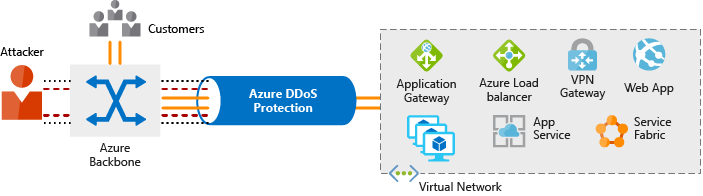
- "The DDoS Protection service helps protect your Azure applications by analyzing and discarding DDoS traffic at the Azure network edge, before it can affect your service's availability."
- "DDoS Protection uses the scale and elasticity of Microsoft's global network to bring DDoS mitigation capacity to every Azure region."
- Note that DDoS attacks can incur many extra costs due to elastic resource allocation (scaling up). The DDoS protection is very important for preventing this.
Tiers:
- Basic: free
- against common network-level attacks
- main focus is preventing that the Azure infrastructure itself is not affected
- Standard
- Additional mitigation options, specifically for protecting Azure Virtual Network resources
- Protection policies are tuned using machine learning
- Policies applied to public IP addresses associated with resources deploy in virtual networks (e.g. Azure Load Balancer; Application Gateway)
- The Azure global network is used to distribute attack traffic across Azure regions
The standard tier defends against:
- Volumetric attacks
- Protocol attacks
- Resource-layer (application-layer) attacks, but note that this requires a WAF!
- Also called layer 7 (L7) attacks. (application layer in the OSI model)
Network Security Groups
NSGs concern protection within an Azure virtual network between resources. One group has no fundamental limitation per group, but there is a max per Azure subscription, if I understand correctly?
Each NSGs has a sensible series of default rules. They cannot be removed, but can be overridden by rules with higher priorities.
A rule contains:
- Name (unique)
- Priority (100-4096)
- Source/destination (IP address or IP range, service tag, application security group)
- Protocol (TCP, UDP, Any)
- Direction (inbound/outbound)
- Port range
- Action (Allow/Deny)
Combining it all
- Perimeter layer
- Azure DDoS protection
- Azure Firewall (possibly also WAF)
- Network layer (restrict lateral movement)
- Segmentation network and apply access controls
- Deny by default
- Restrict inbound and limit outbound
- Implement secure connectivity to on-premises networks
- Combining:
- NSG + Azure Firewall
- Azure Application Gateway WAF + Azure Firewall
WIP: Protecting against security threaths on Azure
- Azure Security Center
- Azure Sentinel
- Azure Key vault
- Secure Azure VMs with Azure Dedicated Host
Azure Security Center
The Azure Security Center shows the security posture of all your services, both on Azure and on-premises. For example, it contains checks/controls for compliance with known cybersecurity policies and allows you to inspect to which extent your resources are compliant.
A main feature is that this works both for on-premises and cloud workloads, also in multiple cloud and hybrid cloud settings.
Features:
- Monitor security settings
- Apply requires security settings to new resources
- Provide security recommendations based on your current configurations
- Automatic security assessments to identify potential vulnerabilities.
- Use ML to detect and block malware
- Adaptive application controls for white listing applications
- Detect and analyse potential inbound attacks
- Investigate threaths and post-breach activity
- Just-in-time access control for network ports to reduce the attack surface; only allow traffic at the moment you actually require it.
Q: What is just-in-time access control.
Overview:
- Cloud security posture management (CSPM)
- Regulatory compliance
- Resource security hygiene
- Security score based on security controls
- Provides discoverability, visibility, guidance and control.
- Cloud workload protection (CWP)
- JIT VM acces
- Adaptive application controls
- Adaptive network hardening
- Check traffic with current NSG settings and make recommendations where to lock down further ("hardening")
- File integrity hardening
- Workflow automation with Azure Logic Apps that respond to Security Center events.
Azure Sentinel
TODO Continue here
Azure Identity Management
Azure Active Directory (AD)
- enables sign in for cloud applications (both from Microsoft and your own)
- can run on Windows server on-premises
- detects suspicious logins at no extra costs
- Can be connected to on-premises AD by using Azure AD Connect
- synchronizes identities between on-premises and cloud systems
- avoids
Services AD offers:
- Authentication
- Single sign-on (SSO)
- Application management
- offers Application Proxy, SaaS apps, My Apps, single sign-on
- Device management
- device registration
- management e.g. trough Microsoft Intune
- device-based Conditional Access policies
Azure Active Directory Domain Services offers managed domain services:
- domain join, group policy, lightweight directory access protocol (LDAP), Kerberos/NLTM authentication
- no need to deploy, manage, and patch domain controllers (DCs)
- Q What are domain controllers?
-
- define a namespace as the domain name
-
- two Windows Server domain controllers (replica set) are deployed in selected Azure region
- This is managed by Azure: e.g. backups, encryption using Azure Disk Encryption
- one-way synchronization from Azure AD to Azure AD DS!
- if AS DS is on-premises, you first use Azure AD Connect to synchronize identify between om-premises AD and Azure AD; Azure AD is then synchronized (one way) with Azure AD DS.
Authentication Methods
- Passwords
- SSO
- single identity across applications that is tied to a single user
- easier to manage, less oopsies
- trust in the initial authenticator
- Multi-factor authentication (MFA)
- Provided by Azure AD Multi-Factor Authentication
- Passwordless
- replaced with something you have
- Windows Hello for Business: if you have your own dedicated PC; PKI + SSO
- Microsoft Authenticator App: either passwordless or MFA
- FIDO2 security keys (Fast IDentity Online): supports WebAuthn standard; keys can be USB devices, Bluetooth, NFC
Conditional Access
Grant or deny access based on identity signals: who is the user, where is the user, from which device is the user requesting access.
- Provide grandular multifactor authentication experience, e.g. only require MFA on unknown locations
- Let MFA depend on requester's role, location, network
- Only approve access through certain client applications
- Only allow access from managed devices
- Block access from untrusted sources
Azure Role-based Access Control (RBAC)
- Principle of least privilege: only grant access up to the level actually needed to complete a task
- Managing this per person is too much work, so instead you define roles and then grant access based on the role
- Azure RBAC offers several built-in roles with common access rules
- Azure RBAC is hierarchical, permissions at parent scope are inherited
- and allow model: so if one role you have gives access to a resource that another group you are in does not have, you still get access
- RBAC is enforced through Azure Resource Manager (ARM)
Roles can be defined at different scopes: for a management group (multiple subscriptions), single subscription, resource group, single resource.
Azure management and governance
OpEx costs are impacted by several factors:
- Resource type
- Consumption
- flexible pay-as-you-go pricing
- reserve use in advance (1 or 3 years), get discount; e.g. for databases
- in addition to fixed costs for consistent workloads, you can still use pay-as-you-go on top of it
- Maintenance
- e.g. if you deprovision a VM, also make sure that connected resources (such as a network interface) are deprovisioned
- Geography
- local vs global
- different costs of power, labor, taxes
- network traffic impacted by geography
- Network traffic
- data transfer prices vary for zones
- Subscription type
- Azure Marketplace
- costs for third-party vendors for services acquired through the Marketplace
TCO
You can estimate costs using the TCO (Total Cost of Ownership) calculator. Designed specifically to compare costs of running in Azure Cloud vs. on-premises, so for example also includes IT labor costs for maintenance of on-premises servers etc.
Cost management
Cost Management provides the ability to quickly check Azure resource costs, create alerts based on resource spend, and create budgets that can be used to automate management of resources.
- Budget alerts
- Credit alerts
- Department spending quotas
Tags
Azure Policy can be used to enforce tagging rules and conventions. Tags are not inherited.
Ways to organize related resources:
- Put them in the same subscriptio
- Put them in a resource group
- Use resource tags that provides useful metadata
Uses of tags:
- Resource management
- Cost management, e.g. used in reporting
- Operations, e.g. group according to availability requirements to determine SLAs
- Security: classify by security level
- Governance & compliance: e.g. tag with owner name; organize by compliance requirements
- Workload optimization: e.g. tag resources with associated workloads
Azure Blueprints
- Define repeatable settings and policies that are automatically applied to new subscriptions
- e.g. deploy a test and development environment with preset security and compliance settings
- components in blueprint definitions are known as artifacts
- artifacts can include role assignments, policy assignments, ARM templates, resource groups.
- They often have parameters for configuration, but this is not always the case
- Azure Blueprints support versioning
- made artifacts are associated with the blueprint that made them
- helps monitoring
Azure Policy
- policies enforce rules to resource configurations to ensure they are compliant to standards
- can also prevent noncompliant resources from being created
- an "initiative" is a group of policies
- many predefined policies and initiatives
- to some extent can automatically remediate noncompliance
- e.g. automatically tag resources that require a certain tag
- integrates with Azure DevOps CI/CD for pre- and post-deployment checks
- Azure RBAC are role-based access control policies
Resource locks
- Two types:
- Delete: can modify, can't delete
- ReadOnly: can read, but can't modify nor delete
- apply regardless of RBAC
Service Trust Portal
- "portal that provides access to various content, tools, and other resources about Microsoft security, privacy, and compliance practices."
Azure Arc
- Azure Arc is for utilizing ARM templates in a multi-cloud and on-premises setup
- This also helps governance and management by extending anything ARM can do to this multi-cloud and on-premises
- Project existing non-Azure resources into ARM, works for:
- Servers
- Kubernetes clusters
- Azure data services
- SQL server
- VMs
- Supposedly supports DevOps into your environment? How?
- "Configure custom locations as an abstraction layer on top of Azure Arc-enabled Kubernetes clusters and cluster extension"
- What does this mean?