Notes on JavaFX
General Idea
1) Layout and OS Interaction: handled by extending the Application class
2) GUI objects: determined by recursive data structure of type Node
3) Override Start of Application to define the Node tree
4) Static method launch of Application makes an object out of it
Object Layout
Hierarchy of objects containing other objects.
Stage - Scene - Parent(Pane,Control).
Stage requires a scene, scene requires a pane, pane requires an object e.g. a circle.
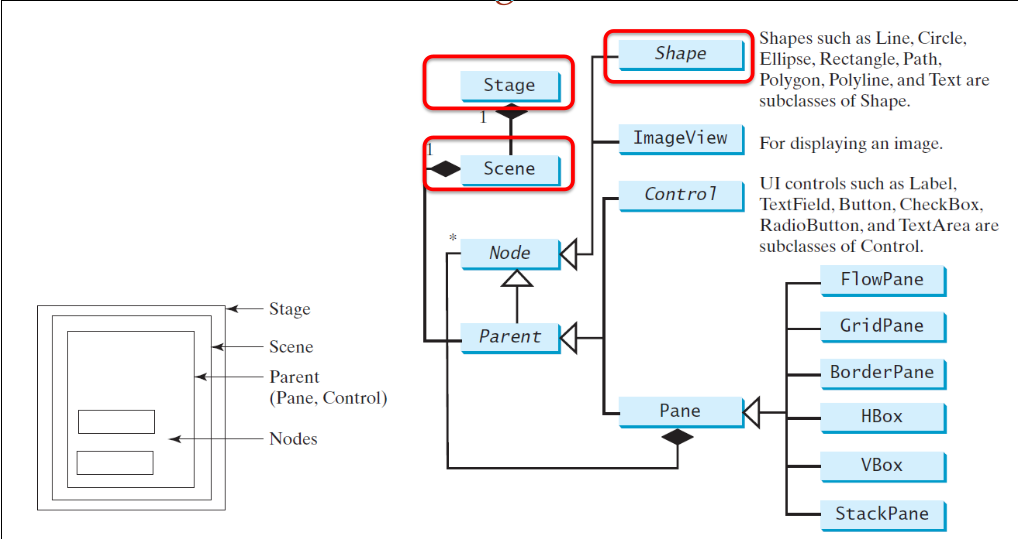
N.B.:
- Always include a pane, even when it is not strictly necessary. This is basically a layout manager.
- Multiple Stages are possible
- A scene can have 0 or more nested
Nodes
MVC pattern and handlers
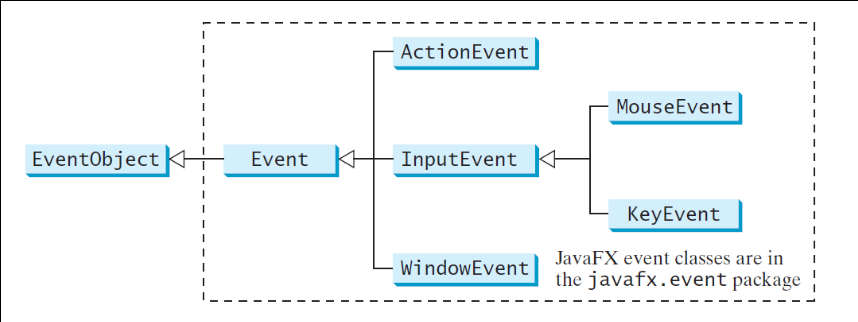
An EventHandler, that extends Events, takes the role of the controller in the MVC pattern.
Depending on how much information the handler requires it can be implemented in various manners:
1) by an object 2) by an application object 3) by a named inner-class (a private class within your class of interest) 4) by an anonymous class extending EventHandler 5) by a lamda-expression for EventHandler
Recommended: use the strategy pattern with a handler strategy. Then we not for example have to create a specialized button class with the desired handler.
Example with anonymous class:
```[Java]
Button button = new Button();
button.setText("Say \"Yolo\"");
button.setOnAction(new EventHandler
Example with lambda-expression:

```[Java]
Button button = new Button();
button.setText("Say \"Yolo\"");
button.setOnAction(e -> System.out.println("Yolo"));
Example with inner-class, where two different buttons require two handlers:
@Override
public void start(Stage primaryStage) {
    Button btn1 = new Button("ok");
    btn1.setOnAction(new OkHandler());
    Button btn2 = new Button("cancel");
    btn2.setOnAction(new CancelHandler());
    HBox root = new HBox();
    root.setAlignment(Pos.CENTER);
    root.setSpacing(10);
    root.getChildren().addAll(btn1, btn2);
    Scene scene = new Scene(root, 200, 60);
    primaryStage.setTitle("2 buttons 2 handlers");
    primaryStage.setScene(scene);
    primaryStage.show();
}

private class OkHandler implements EventHandler<ActionEvent> {
    public void handle(ActionEvent event) {
        System.out.println("ok pressed");
} }
private class CancelHandler implements EventHandler<ActionEvent> {
    public void handle(ActionEvent event) {
        System.out.println("cancel pressed");
} }
In case all buttons require only one handler, make a handler class that extends Application implements EventHandler<ActionEvent>.
Then define public void handle(ActionEvent event) and make sure to use typecasting to only handle button events:
public void handle(ActionEvent event) {
    Button btn = (Button) event.getSource();
    System.out.println(btn.getText() + " pressed");
}
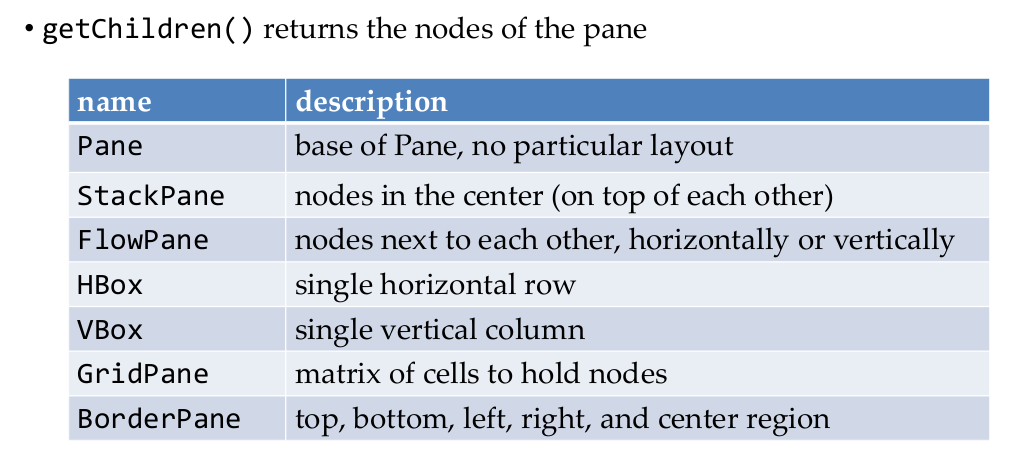
Panes / Layout Managers
Example with VBox pane. As said before, a Scene requires a pane, handling the layout of its contained nodes.
```[Java] Vbox vbox = new VBox(); vbox.getChildren().addAll(button1,button2); Scene scene = new scene(vbox,150,100); primaryStage.setTitle("Example"); primaryStage.setScene(scene); primaryStage.show();
## Properties
Properties are Java objects containing a value. Many JavaFX objects are properties.
They can be bound to other properties, so that when the source property changes, bound properties also change:
target.bind(source);
This is for example useful to resize an object when its containing pane is resized:
ellipse.radiusXProperty().bind( root.widthProperty ().multiply(0.45)); ellipse.radiusYProperty ().bind( root.heightProperty ().multiply(0.45)); ```
When a property x is bound to another property y, property X cannot be set explicitly on itself. Either chance y, or unbound x.
Using the mouse
When a mouse press event generates a new node, you cannot use the handler of that node for dragging it around (because that handler already creates the node). To solve this, use the drag handler of its parent. The case is (I think) thus a situation in which you want to create a node and drag it around to place it somewhere, with one mouse click.
The delivery of the mouse events proceeds as follow:
1) Target selection. By default, only a top node receives events. If you also want to, for example drag, the background nodes, use node.startFullDrag().
2) Route construction, by default from stage to scene, to pane, to node unless filters(?) change this.
3) Event capturing: after target selection, the event is passed down the route top-down.
4) Event bubbling: after reaching the target, handlers are called bottom-up until "consumed". Everything on the route can have its own handler, but without a handler the event is just passed along on the route until another handler "consumes" it.
A handler must consume an event explicitly. For an event e, call e.consume() in the handler.
Time
JavaFX and the MVC pattern
- Model: state of the program, incl. properties (they are observable)
- View: the JavaFX stages
- Controller: the event handlers, buttons, textfields, ticker for timeline
In the MVC pattern, the view is the observer of the model.
Observer Pattern
1) The model notifies the view when something occurs. 2) The view observes the model
Terminology: the observer attaches itself to a observable subject
Example: Buttons notify action listeners when they are pressed (1) and action listeners attach themselves to the button to be notified.
When do we use the observer pattern?
Situation: We have some source of events, and we have one or more observer objects that need to be notified.
1) Define observer interface
2) All concrete observers implement it
3) Any observable extends the Observable class (this is not an interface!)
3) The subject maintains a collection of all its observers
4) The subject needs methods for attaching and detaching observers
5) The subject notifies all observers in case there is a change
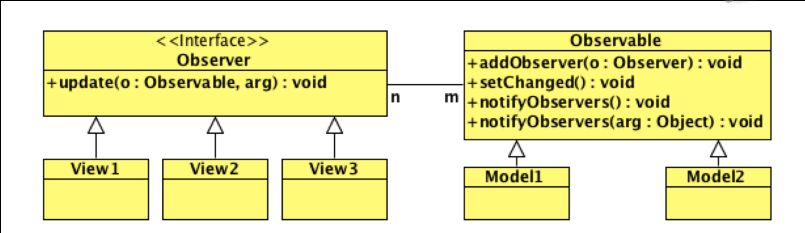
The Observer interface only has one method:
void update(Observable o, Object arg), where 'o' is the observable object notifying this observer.
MVC + Observer
1) Model extends Observable 2) View implements Observer 3) The main class that extends Application probably is also partially a view that implements Observer 3) Make a model 3) Controller must know the model, so pass it in the constructor 5) Add observers to the model with addObserver function. Pass views that implement Observer.